Sample Ansible project to generate EVPN/VXLAN configuration
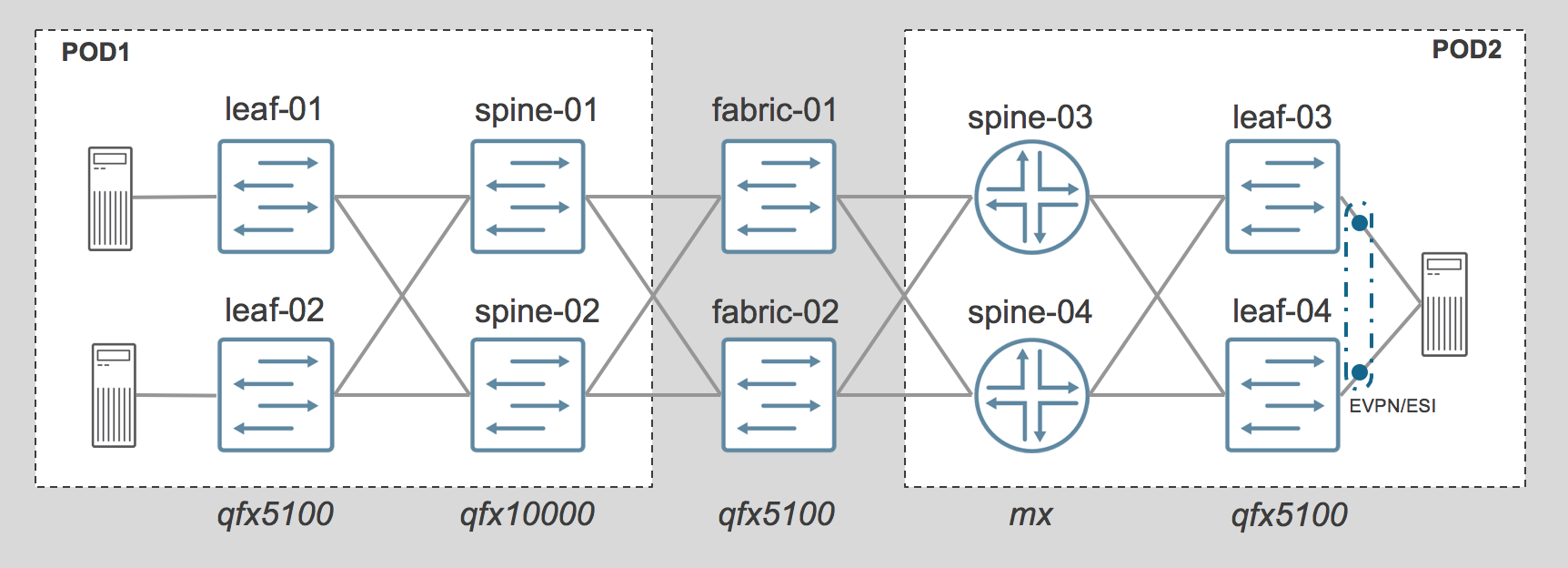
- This project is simulating the creation of a 2 pods EVPN/VXLAN Fabric, POD1 & POD2:
- Each POD is composed of 2 spine and 2 leaf
- PODs are interconnected with 2 qfx5100 acting as Fabric, these are not running EVPN
- On POD1
- Spine are QFX10K and leaf are QFX5000
- Leaf are configured with Vlan normalization on their access ports facing servers
- On POD2
- Spine are MX480 and leaf are QFX5000
- Leaf are configured with standard trunk interface facing servers,
- 1 server is dual-attached to both leaf using EVPN/ESI and LACP
All devices names, Ip addresses loopback addresses etc .. are defined in the inventory file named hosts.ini.
All physical connections are defined in the topology file under group_vars/all.
Regenerate configurations
Even without real devices, it’s possible to regenerate configurations for all devices using ansible playbooks provided with the project
To verify that Ansible & Ansible Junos module for Ansible are properly installed, you can try to regenerate all configs with this command:
ansible-playbook pb.conf.all.yaml
Note
By default, all configurations generated will be stored under the directory config/ and will replace existing configuration store there
Scale configurations
- The project come with some a solution to easily change the scale of the setup, it’s possible to :
- Change the number of tenants
- Change the number of VNI per tenants
To scale the configuration, you need to change some input parameters in the file group_vars/all/tenant_vni.yaml *Please refer to instructions in generate-tenant-vni role
Once the input file is modified, you need to regenerate variables first and them regenerate configurations.
ansible-playbook pb.generate.variables.yaml
ansible-playbook pb.conf.all.yaml